


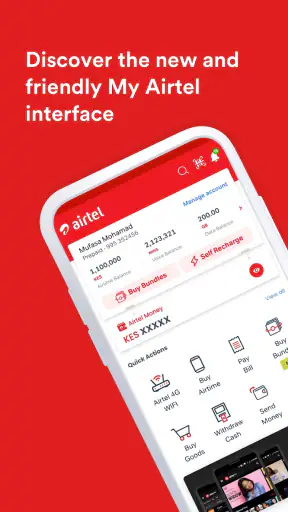
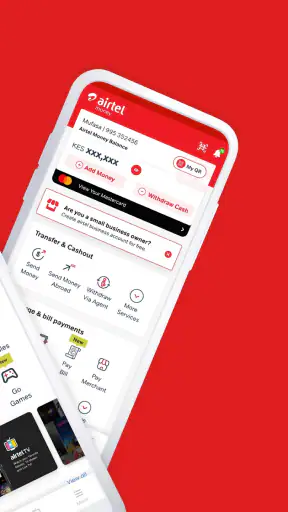
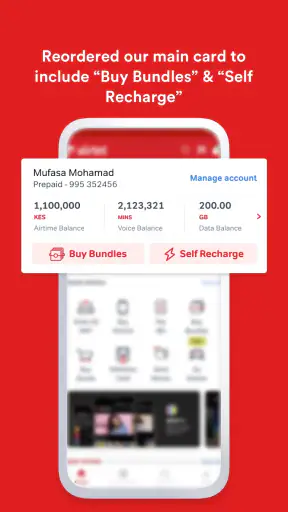
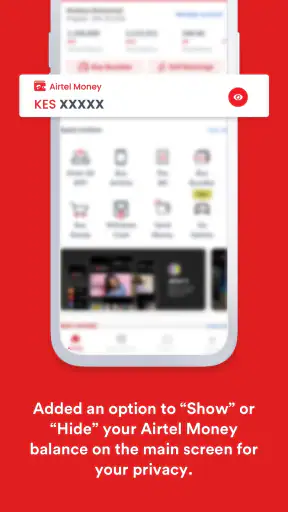
I usually judge a utility app by what happens when I need it quickly, not by how impressive its feature list looks. My Airtel is designed for that kind of moment: I open it when I need to recharge a mobile line, settle a bill, move money, or check the status of a transaction without switching between several unrelated services. Developed by Airtel Africa, it sits in the lifestyle category, but in daily use it feels more like a practical control point for communication and payments.
The app is free and available to users aged Everyone, which makes its intended audience broad. It has reached over 50 million installs and holds a 4.5 average from around 583 thousand ratings, so it is clearly not a niche companion app. I found that its biggest strength is convenience when my Airtel services and payment needs are already part of the same routine. Its biggest weakness is equally clear: the experience depends heavily on the services available to my account and location, so it is not automatically the best choice for every payment task.
Following one everyday payment journey from need to outcome
Starting with a simple problem
A realistic use case is running low on mobile credit while away from home. The old approach might involve finding a shop, handing over cash, explaining the number, and waiting for confirmation. My Airtel changes that starting condition by putting the recharge step on the phone. I can begin from the app rather than searching for a separate website or relying on a third-party payment application.
That matters most when the request is routine but time-sensitive. A person managing a personal line may want a quick top-up, while someone responsible for a family member’s connection may need to handle another Airtel number. The useful question is not whether the app can replace every financial tool, but whether it reduces the number of steps between noticing a problem and fixing it.
I also see value in the broader situation where several small tasks arrive together. A recharge, a bill payment, and a money transfer are different actions, but they often happen during the same busy evening. Keeping them in one Airtel-focused environment is less mentally demanding than remembering which service handles each one. The real benefit is continuity: the same app can sit at the beginning, middle, and end of a routine payment job.
Moving through recharge and bill payment
The first step is choosing the task that matches the immediate need. For a mobile top-up, I would check the selected number carefully before continuing. This is a small habit, but it is one of the most important practical safeguards in any recharge app. A fast interface can make it easy to move forward before noticing that the wrong line is selected.
For a bill, the workflow changes because the destination is not simply a mobile balance. I need to identify the bill-related option, enter or select the relevant details, and review the amount before confirming. The app’s value here is not that it makes every bill identical; it gives me one starting place for payment-related tasks connected to Airtel’s ecosystem.
I would not treat the first screen as a place to rush through. My preferred routine is to pause at the confirmation stage, check the recipient or service, verify the amount, and only then authorize the transaction. That extra moment is more useful than trying to save a few taps. It also makes troubleshooting easier if something later appears delayed or unclear.
Choosing the payment route
The handoff from selecting a service to completing payment is where a utility app earns or loses my trust. My Airtel brings the transaction into a single flow, but the final experience can still depend on the payment method, the account setup, and the service involved. I see the app as an organizer of the process rather than a guarantee that every step will feel identical.
For money transfer, the details deserve even more attention. A transfer is not the same as buying airtime: the recipient matters, and a mistake may be more difficult to correct than an incorrect personal recharge. I would enter the destination deliberately, review it, and avoid starting the process while distracted. That is a practical limitation of convenience apps in general, but it is especially important when one application handles both low-risk top-ups and more consequential transfers.
The app’s support for bank and wallet-related transfers makes it more useful for people who move between everyday communication and financial tasks. At the same time, I would not assume that a wallet workflow and a bank workflow have identical timing or confirmation behavior. The right habit is to read each confirmation screen rather than relying on memory from the previous transaction.
Handling the handoffs between people and services
In a real household, the person who notices the problem is not always the person who owns the account. I might receive a message from a relative asking for a recharge, make the payment myself, and then wait for the recipient to confirm that the balance arrived. That creates a handoff outside the app. My Airtel can start the transaction, but the final proof of success may still involve a notification, a message, or the recipient checking their own service.
This is why I would keep the transaction confirmation visible until I know the outcome. If the recipient says the balance has not appeared, I want to know whether the app showed a completed action, whether the process was still pending, or whether I stopped before authorization. That small distinction prevents me from repeating a payment unnecessarily.
The same thinking applies to bills. If I pay on behalf of another person, I would record the date and amount in my own notes or send a confirmation message immediately. The app may make the payment convenient, but household accounting still needs a human handoff. This is one of the less obvious trade-offs: centralizing the action does not automatically centralize everyone’s understanding of what happened.
What the completed result feels like
When the flow works, the result is pleasantly direct. I have used one place to handle a mobile recharge, a bill, or a transfer instead of opening separate services and rebuilding the context each time. That is particularly helpful for repeat actions, where the main advantage is not discovery but reducing routine friction.
I also like the psychological simplicity of having an Airtel-specific starting point. If my mobile service, payment needs, and account activity are already tied to Airtel, I do not have to decide which general-purpose payment app is most appropriate for a basic Airtel task. The app narrows the route from problem to action.
Still, I would define success carefully. A successful tap is not the same as a successful outcome. For a recharge, I want the balance to update. For a bill, I want the payment to be accepted. For a transfer, I want the recipient or destination to receive it. My recommendation is to check the result before closing the app, especially when the action is urgent or involves someone else’s money.
Where the flow can break
The first possible break is account or service fit. My Airtel is strongest when I am already using Airtel services and the task belongs inside the app’s supported ecosystem. Someone who mainly uses another carrier, prefers a separate bank application, or wants a broad multi-provider finance dashboard may find the app less useful than a general payment tool.
The second break is uncertainty after confirmation. A delayed balance, an unclear transfer state, or a bill that takes time to reflect can tempt me to submit the same payment again. I would resist that impulse until I understand the transaction status. Repeating an action is not a solution when the first attempt may still be processing.
The third break is human error. The app can make a transaction shorter, but it cannot decide whether I selected the correct number or recipient. A familiar interface may even encourage overconfidence. My practical rule is simple: slow down for the details, then move quickly only after they are correct.
How it compares with the usual alternatives
Compared with visiting a retail outlet, My Airtel is more convenient for people who already have a phone, a supported payment method, and enough confidence to complete the process themselves. It removes the need to travel for ordinary recharges and gives me more control over when I act. A shop may still be preferable when I need personal assistance or when someone else is paying on my behalf.
Compared with a bank application, the Airtel app has a narrower but more relevant focus for Airtel-related tasks. A bank app may be better for reviewing a wider financial picture, managing accounts, or handling services outside the Airtel environment. My Airtel is better when the starting point is an Airtel line, Airtel bill, or Airtel-connected transfer rather than general banking.
Compared with a general wallet, the choice depends on the center of my routine. A broad wallet can be more flexible across providers, while My Airtel can feel more straightforward when my main need is Airtel service management. I would choose the latter for a focused recharge or related payment, and keep the general wallet for situations where I need to compare or pay across several unrelated services.
Who will get the most from it
I think the app suits Airtel customers who regularly recharge, pay bills, or send money and want one familiar place to begin. It is also useful for people who handle these tasks for family members, provided they are willing to verify numbers and keep track of confirmations. The free price removes a common barrier to trying it, and the Everyone age rating makes it approachable for a wide range of users.
It is less suitable for someone who wants a carrier-neutral payment hub. If most of my activity involves different mobile networks, several banks, or services unrelated to Airtel, I would probably prefer a broader financial application. I would also skip making it my only payment tool if I need detailed banking controls rather than a focused route for Airtel-centered actions.
Practical habits that make the app safer to use
My first tip is to separate “starting a transaction” from “confirming the outcome.” I would begin the recharge or payment, review the final details, and then wait for a clear result before leaving. This is more reliable than assuming the transaction succeeded because the button responded.
My second tip is to treat transfers as a different level of responsibility from airtime purchases. I would double-check the recipient and amount, especially when sending money for another person. The app’s ability to put multiple financial actions together is convenient, but that convenience should not make the checks feel interchangeable.
My third tip is to use the app as the first place to investigate a problem rather than immediately starting a second attempt. If a recipient reports a delay, I would review what the original flow showed and compare that with the recipient’s side. This avoids turning one uncertain transaction into two completed payments.
My fourth tip is to decide in advance which app owns which task. I would use My Airtel for Airtel-centered actions, a bank app for broader account management, and a general wallet when provider flexibility matters more. That simple division reduces confusion and makes it easier to know where to look when something needs checking.
Long-term experience and upkeep
My Airtel was released on August 28, 2019, and the current version is 1.4.22. It requires Android 8.0 or later, so device compatibility is something I would check before planning to use it on an older phone. For a payment app, keeping the installed version current is also a sensible routine because the interface and transaction flow can change over time.
The app’s large install base and strong average rating suggest that many users find its central purpose worthwhile, but those figures do not remove the need for personal testing. Payment convenience varies with the account, service, and situation. I would start with a small, familiar task, learn how confirmations appear, and only then rely on it for more involved transfers or household payments.
After using it as a complete workflow rather than just a recharge button, my view is positive but focused. My Airtel is not a replacement for every bank or wallet, and it cannot eliminate the need to check recipients, amounts, and outcomes. What it does well is bring Airtel-related mobile and payment tasks into one practical route. If your daily starting point is an Airtel service, this is a sensible app to keep ready; if your needs are provider-neutral, a broader alternative may serve you better.
That is the recommendation I would give a friend: try it for the task you repeat most often, pay attention to the confirmation handoff, and judge it by whether it makes that specific routine easier. For the right Airtel customer, My Airtel turns several small chores into a manageable phone-based workflow without pretending that convenience replaces careful checking.


